Editor Overview
The Zvid Editor (editor.zvid.io) is a browser-based visual editor for the exact JSON the API renders. Design on a canvas and timeline, then render directly from the editor — or export the payload and automate it through the API. Anything you build visually stays a plain, inspectable Zvid project.
The workspace
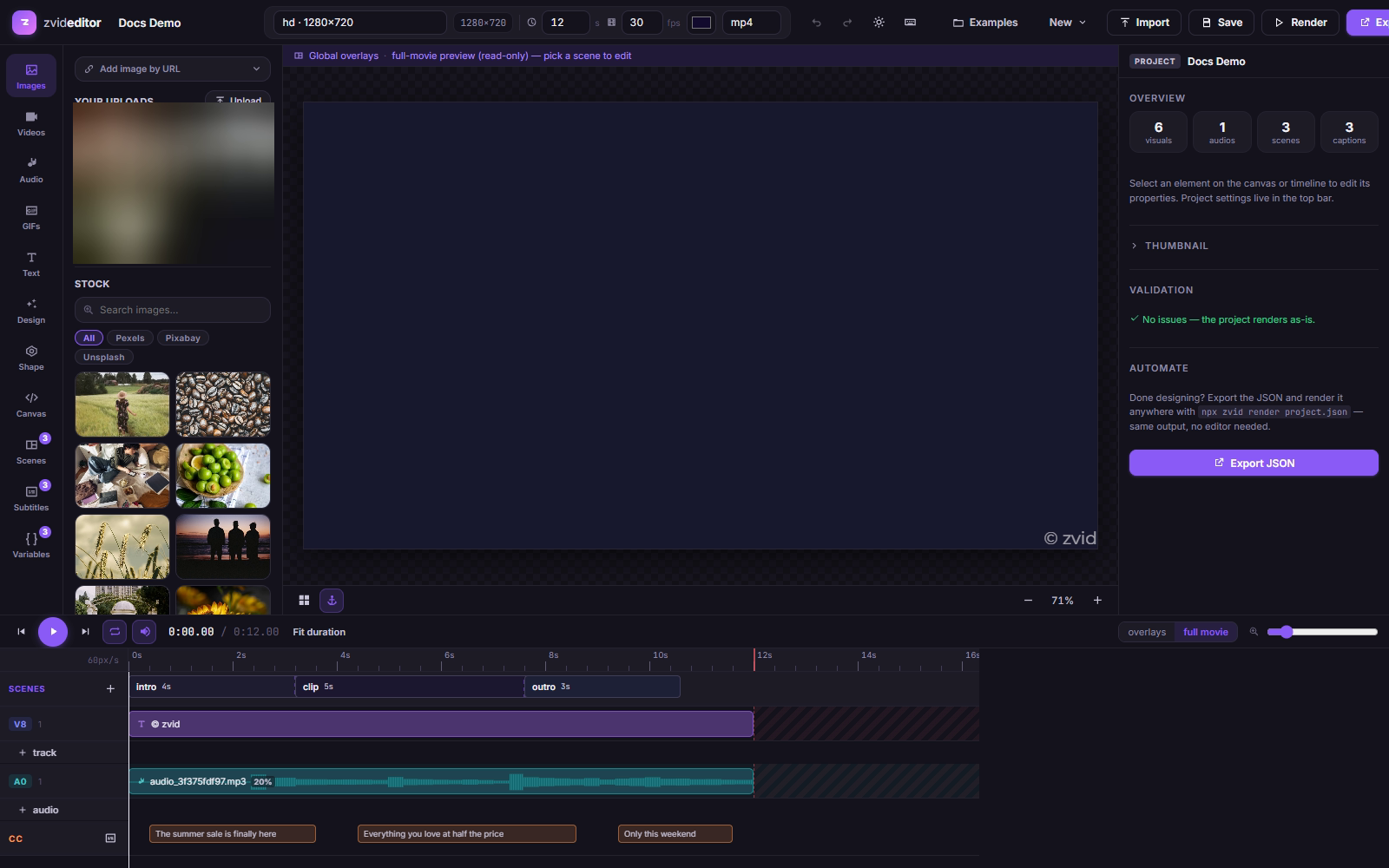
| Area | What it does |
|---|---|
| ① Left rail | 11 tabs: Images, Videos, Audio, GIFs (media & stock), Text, Design (Design Studio), Shape, Canvas (animated presets), Scenes, Subtitles, Variables. |
| ② Canvas / stage | Direct manipulation: select, drag, resize, rotate, snap. See Canvas & Stage. |
| ③ Inspector | Per-element editing in four tabs — Design, Timing, Effects, JSON (the element's raw JSON, always one click away). |
| ④ Timeline | Tracks, clips, scene strip, subtitle lane, transport controls. See Timeline & Scenes. |
| ⑤ Top bar | Project name, resolution (19 presets or custom), duration, frame rate, background color, output format — plus undo/redo, theme, shortcuts, import, Save, Render, Export. |
Video and image projects
New → Video or New → Image. Image projects render to PNG / JPG / WebP and hide the time-domain tools (Videos, Audio, GIFs, Scenes, Subtitles tabs and the timeline) — what's left is a focused graphic designer.
Editor ⇄ API round-trip
- Export produces the API-ready payload — as raw JSON or as a Node.js / CLI / HTTP snippet (Rendering & export).
- Import accepts any Zvid payload, including ones you've built by hand.
- Save as template stores the project as a
tpl_…template you can render with variables via the API. - Deep links
?project=prj_…/?template=tpl_…open cloud projects directly (Projects & saving).
Where to go next
- Projects & saving — drafts, cloud sync, deep links
- Adding media — uploads and built-in stock search
- Text & Design Studio — 78 animation presets
- Timeline & scenes — trims, splits, transitions
- Rendering & export — render in-app or take the JSON to the API